Showing posts with label Command Prompt. Show all posts

Make Matrix Rain Using Notepad


1
Open notepad and type what you see below this. The numbers after the word echo are random. 


@echo off
:a
color 2
echo 1 1 1 0 1 0 0 0 1 1 1 1 0 0 0 1 1 0 0 1 0 0 0 1 1 0 1 0 1 0 0 0 1 1 1 1
ping localhost -n 1 > nul
echo 1 1 0 1 1 1 0 0 0 1 0 1 a f h 0 0 0 1 0 1 1 0 0 1 1 1 0 0 1 0 1 0 0 1 1 0
echo 1 0 0 1 1 0 9 8 1 2 0 1 9 9 2 1 1 1 0 0 1 0 1 1 1 0 1 1 0 1 0 0 0 1 0 1 1
ping localhost -n 1 > nul
echo 0 1 0 0 0 1 0 0 0 1 0 0 0 1 0 1 0 0 1 0 1 0 1 1 0 1 0 0 0 01 0 1 0 0 1 0
ping localhost -n 1 > nul
echo 1 0 1 1 1 0 1 1 0 9 1 1 2 1 1 0 9 1 0 5 7 7 8 7 8 1 3 2 1 2 1 2 3 2 1 3 4
ping localhost -n 1 > nul
echo 1 1 1 0 1 0 0 1 0 0 0 1 1 1 0 0 1 1 1 4 1 2 1 1 2 0 1 0 1 2 2 1 0 1 1 0 1
goto a

2
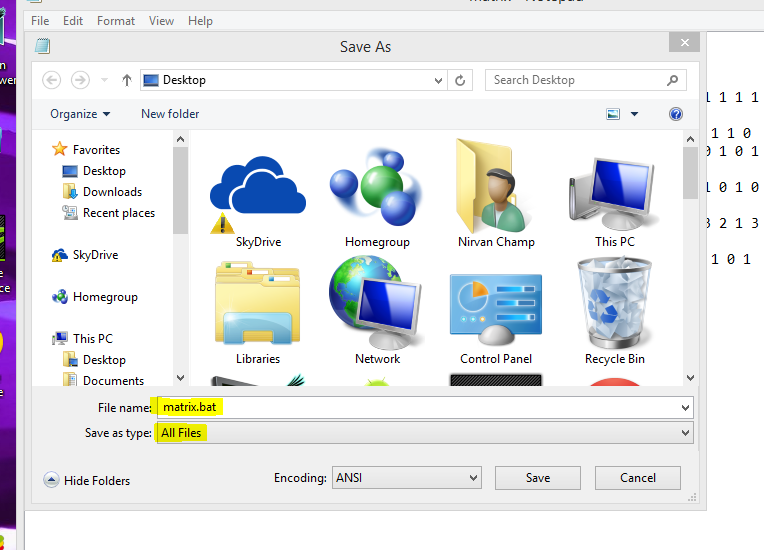
When done typing this save in the all files in the desktop it as anything you want. Just remember to add .bat at the end of the name. Choose "All Files" to make it work
3
Open the file you saved.Enjoy


Make Undeletable, Unrenamable Folders

Make Undeletable, Unrenamable Folders

Have you ever wondered how you can make a folder which neither can be deleted nor be renamed. Well, if you have, then you have come to the right place. With this trick, you will be able to create folders in Windows which cannot be renamed or deleted.

Basic Concept
The basic concept behind this trick is the use of Keywords. Keywords are reserved words in any programming language that cannot be used as names of variables. Windows also uses certain keywords in its programming. Some of them are con, aux, lpt1, lpt2, lpt3, lpt4, lpt5, lpt6, lpt7, lpt8 and lpt9.

Make Undeletable and unrenamable folders

A Test
To test this concept, make a new folder in Windows and try to give it a name same as any keyword suggested above.

Result
Windows will not rename your folder to any of the keyword given above.

Trick
So the question arises, how can we make a folder with a keyword as its name? The solution to this problem is included in Windows itself. As we know that Windows has evolved from D.O.S.(Disk Operating System), its commands can be used in Windows. You can use D.O.S. Programming in Windows to create a folder with a keyword as its name using the steps given below:-

  1. Click on Start.
  2. Click on Run. Type in "cmd" without quotes.
  3. In the Command Prompt Window that opens, type the name of the drive you wish to create your folder in the format <drive-name>: and press Enter. e.g. If you wish to create the undeletable folder in D drive, type "D:" without the quotes. Note that the folder cannot be created in the root of C:/ drive (if C: is your system drive).
  4. Type this command- "md con\" or "md lpt1\" without the quotes and press Enter. You can choose any of the keywords given above as the name of your folder.

Now Windows will create an undeletable, unrenamable folder in the drive you entered in Step 3. However the folder can be renamed to another keyword using Windows Explorer.

Deleting the Folder 


Although it is not possible to manually delete the folder, you can delete the folder by typing "rd con\" or "rd lpt1\" in Step 4 instead of "md con\" or "md lpt1\".

Windows Compatibility: This works on Windows XP, Windows Vista, Windows 7 and Windows 8.

Try it yourself to create one such folder which can neither be deleted nor be renamed.

Watch ASCII Star Wars in Windows XP, Vista, 7 and 8

Every one of us has watched Star Wars on television, computer or in a theater. It is the same movie with aliens fighting each other for galaxies and such stuff. There is nothing new in it. But wait, have you watched an ASCII (American Standard Code for Information Interchange) version of Star Wars and that too in Windows using telnet? A network protocol known only to computer wizards. Well if you have not, then you must do it now!

There is a complete copy of Star Wars done entirely in ASCII characters that you can watch in theWindows operating system (or any OS that supports telnet). The only thing required to watch it is an internet connection; speed does not matter.

A Picture showing Star Wars in command prompt

To watch it on Windows XP, Mac OS X and Linux
  1. Go to Start, Run. (Only for Windows users)
  2. Now type "telnet towel.blinkenlights.nl" without the quotes and press Enter. Users of Mac OS X and Linux can directly execute this code in the terminal window.

On Windows 8, Windows 7 and Windows Vista

Telnet is turned off by default in the latest versions of Windows. So, in order to watch star wars, you must first enable telnet by going to Control Panel › Programs › Turn Windows Feature On or Off and ticking both the telnet check boxes. After doing that, follow the steps given below:-
  1. Go to Start, Search in Windows Vista and Windows 7. On Windows 8, open the main Start page.
  2. Type telnet and press Enter.
  3. In the following command prompt window, type "o" without quotes and press Enter.
  4. Now type "towel.blinkenlights.nl" without the quotes and press Enter.
If you do not need telnet anymore, you can turn it off.

A command prompt window like the one in the image will open with the movie being played in it. See the movie yourself. Did you enjoy watching this new version of Star Wars? Well, I did and know it for sure that you would have too.